NSPG
Monthly E-Newsletter
Click Here to view
as Web Page
| Business Solutions for Maximizing Profits | January 2005 |
|
||||||
|
 |
|
|

|
|
|
For over 10 years, NSPG has been providing the tools
that allow contractors to increase profits and minimize
business hassles. With our simple-to-use-tools, you can make being a business owner what
you always wanted to it be -
successful, profitable and rewarding.
|
 What's
Your Selling Price? What's
Your Selling Price?
|
|
Numbers Cruncher users
don't really have to deal with calculating their selling
price because it's automatically calculated for them,
but it's always good to know what's really happening.
Remember, if you use Numbers Cruncher, the following is done for you automatically, so you don't have to worry about learning how to do it yourself.
Breakeven Cost Per
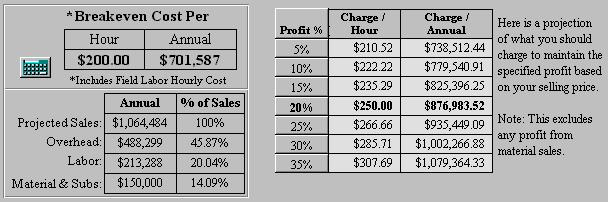
Hour Total Costs are sometimes easy to find. If you have a good accountant, he may be able to generate a report for you that lists everything you need. Or, if you use an accounting program, and if you have it set up right, and if you know how to do it, you can generate your own report that will list and total all of your costs. Otherwise, start with your business checkbook and - using pencil and paper or a spreadsheet program - manually add up all of your expenses for some period of time. For Numbers Cruncher users, this is the process that happens when you fill in the Budget form. Next, total up all of your field employee costs. This includes salaries, benefits, taxes, bonuses, etc. Add this numbers to your other costs to get the Total Business Cost. The time period should be selected so you are sure to capture all of your costs. Some costs, like insurance and membership dues, may only happen once a year, so don't forget them. Next you will need to total up all the hours for all your field employees that were billed during that time period. If you use time cards, this could be an easy task. Or, if your invoices include a billed time factor, review them and add up the hours billed. If you are using NSPG Flat Rate, your Tasks have a time factor built into them, so your invoices will allow you to know the amount of time billed on each job. These steps are combined on the Tech Pay form in Numbers Cruncher. Here's how you get your Breakeven Cost per Hour from the Total Costs and Productive hours that you calculated using the methods explained above. Divide your Total Costs by your Total Productive Hours to get your Breakeven Cost per Hour. Breakeven = Total Costs ÷ Total Productive Hours Remember that Productive hours are the hours you actually bill to a customer. They are NOT the numbers of hours you pay your field employees for. If you are doing service work, it's just about impossible to bill 40 hours in a 40 hour week. Most companies bill between 20 and 30 hours. Set Your Selling
Price Selling Price = Breakeven + (Profit% X Breakeven) This is a simple enough concept, but it involves two separate calculations and can lead to confusion. So here's and easier way to calculate your Selling Price. Selling Price = Breakeven ÷ (1 - Profit%) Let's say your Breakeven is $200.00 (see Numbers Cruncher example below) and your profit target is 20%. Here's how the Selling Price calculation would look: Selling Price = $200 ÷ (1 - 0.20) = $250.00 This would yield you a 20% profit of $50 per productive hour. You should check and adjust this number on a regular basis. Your costs change regularly, so you need to be sure that your Selling Price continues to yield the profit you expect.
Whether you use Numbers Cruncher of pencil and paper, you MUST accurately set your own selling price. Understanding how it works will allow you to make the right decisions on setting your prices at a level that covers your costs and earns you the profit you need to stay in business and serving your customers.
Measure Monthly, Adjust Quarterly Call us at 800-841-8542 to schedule a Numbers Cruncher Review so you can be sure that you are making the profits you need every day.
|
| National Standard Price Guide Flat Rate -- NOW! |
|
If you have a free NSPG software demo CD, you have the full version installation of the NSPG Flat Rate software. Insert the CD and choose the Full version of the software to begin the installation.
You can be Flat Rating in about an hour. |
 Call
us at 800-841-8542 to purchase the software. Then
you can start the program. Enter the registration
code, and download the latest version. We'll even
ship you a printed copy of the user manual.
Call
us at 800-841-8542 to purchase the software. Then
you can start the program. Enter the registration
code, and download the latest version. We'll even
ship you a printed copy of the user manual.|
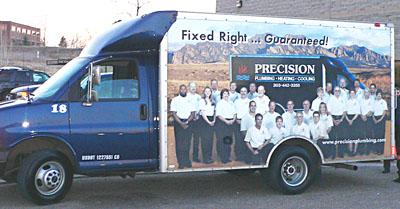
Precision Plumbing, Heating & Cooling is a $4 million in sales Nexstar member that has had an average growth rate of 100% over the last 4 years. The company was 100% new construction and has converted to 100% service. They have been voted "Best of Boulder" three years in a row and received the Better Business Bureau's 2003 Gold Star Award. Thanks Tom.
|
|
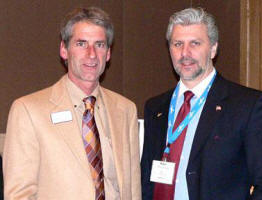
Tom Robichaud & Mike Conroy at Precision Plumbing |
 |
|
Save $700 Today
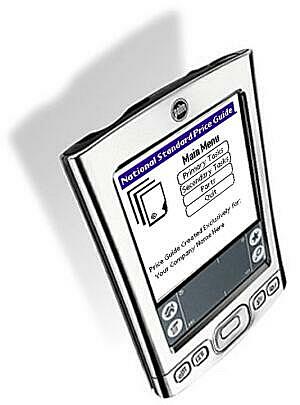
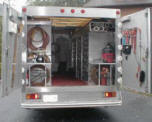
The NSPG Flat Rate system with Truck & Shop inventory is designed to really help you improve your business and increase your profits. The NSPG Flat Rate system allows you to quickly and easily have Flat Rate price books that match your company‘s needs, and now you can put it on your Palm too. This means that you can have the best Flat Rate price books on the market plus get a complete flat rate system in your Palm for Free. Call 800-841-8542 to get started today.
|
|
|
|
|